
- (Exam Topic 5)
Your company has two offices. The offices are located in Seattle and New York. The company uses a third-party email system.
You implement Microsoft 365.
You move all the users in the Seattle office to Exchange Online. You configure Microsoft 365 to successfully receive all the email messages sent to the Seattle office users.
All the users in the New York office continue to use the third-party email system. The users use the email domains shown in the following table.
You need to ensure that all the email messages sent to the New York office users are delivered successfully. The solution must ensure that all the email messages for the users in both offices are routed through Microsoft 365.
You create the required DNS records and Send connectors. What should you do next from Microsoft 365?
Correct Answer:
B
The first step is to configure Exchange Online to accept emails for the adatum.com domain. To do this, we add the domain in Microsoft 365. When you add your domain to Microsoft 365, it's called an accepted domain.
The next step is to tell Exchange Online what to do with those emails. You need to configure the adatum.com domain as either an authoritative domain or an internal relay domain.
Authoritative domain means that the mailboxes for that domain are hosted in Office 365. In this question, the mailboxes for the adatum.com domain are hosted on the third-party email system. Therefore, we need to configure the adatum.com domain as an internal relay domain. For an internal relay domain, Exchange Online will receive the email for the adatum.com domain and then ‘relay’ (forward) the email on to the third-party email server.
References:
https://docs.microsoft.com/en-us/exchange/mail-flow-best-practices/manage-accepted-domains/manage-accepte
- (Exam Topic 5)
Please wait while the virtual machine loads. Once loaded, you may proceed to the lab section. This may take a few minutes, and the wait time will not be deducted from your overall test time.
When the Next button is available, click it to access the lab section. In this section, you will perform a set of tasks in a live environment. While most functionality will be available to you as it would be in a live environment, some functionality (e.g., copy and paste, ability to navigate to external websites) will not be possible by design.
Scoring is based on the outcome of performing the tasks stated in the lab. In other words, it doesn’t matter how you accomplish the task, if you successfully perform it, you will earn credit for that task.
Labs are not timed separately, and this exam may have more than one lab that you must complete. You can use as much time as you would like to complete each lab. But, you should manage your time appropriately to ensure that you are able to complete the lab(s) and all other sections of the exam in the time provided.
Please note that once you submit your work by clicking the Next button within a lab, you will NOT be able to return to the lab.
You may now click next to proceed to the lab. Lab information
Use the following login credentials as needed:
To enter your username, place your cursor in the Sign in box and click on the username below.
To enter your password, place your cursor in the Enter password box and click on the password below.
Microsoft 365 Username: admin@LODSe426243.onmicrosoft.com Microsoft 365 Password: 3&YWyjse-6-d
If the Microsoft 365 portal does not load successfully in the browser, press CTRL-K to reload the portal in a new browser tab.
The following information is for technical support purposes only:
Lab Instance: 10887751
You need to modify Christie Cline to meet the following requirements: Christie Cline must be able to view the service dashboard and the Microsoft Office 365 Message center. Christie Cline must be able to create Microsoft support requests. The solution must use the principle of least privilege.
Solution:
You need to assign Christie the ‘Service Support Admin’ role.
* 1. In the Microsoft 365 Admin Center, click ‘Roles’.
* 2. Scroll down to the Service Support Admin role and click on the role name.
* 3. Click the ‘Assigned Admins’ link.
* 4. Click the ‘Add’ button.
* 5. Start typing the name Christie then select her account when it appears.
* 6. Click Save. References:
https://docs.microsoft.com/en-US/azure/active-directory/users-groups-roles/directory-assign-admin-roles
Does this meet the goal?
Correct Answer:
A
- (Exam Topic 3)
You need to configure the Office 365 service status notifications and limit access to the service and feature
updates. The solution must meet the technical requirements.
What should you configure in the Microsoft 365 admin center? To answer, select the appropriate options in the answer area.
NOTE: Each correct selection is worth one point.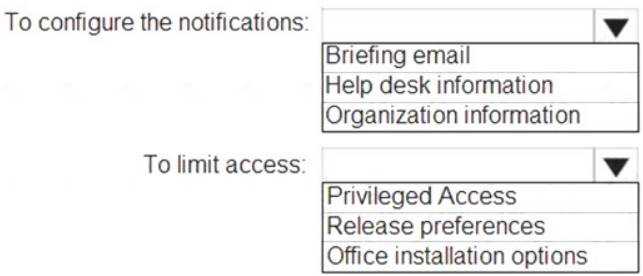
Solution:
Graphical user interface, text, table Description automatically generated
Reference:
https://docs.microsoft.com/en-us/briefing/be-admin
https://docs.microsoft.com/en-us/microsoft-365/admin/manage/release-options-in-office-365?view=o365-world
Does this meet the goal?
Correct Answer:
A
- (Exam Topic 5)
Your network contains an Active Directory domain named .Ki.ituin.com that is synced to Microsoft Azure Active Directory (Azure AD).
The domain contains 10O user accounts.
The city attribute for all the users is set to the city where the user resides.
You need to modify the value of the city attribute to the three letter airport code of each city. What should you do?
Correct Answer:
C
The user accounts are synced from the on-premise Active Directory to the Microsoft Azure Active Directory (Azure AD). Therefore, the city attribute must be changed in the on-premise Active Directory.
You can use Windows PowerShell on a domain controller and run the Get-ADUser cmdlet to get the required users and pipe the results into Set-ADUser cmdlet to modify the city attribute.
Reference:
https://docs.microsoft.com/en-us/powershell/module/addsadministration/set-aduser?view=win10-ps