
Which of the following passwords is the most complex?
Correct Answer:
C
Comprehensive and Detailed 250 to 350 words of Explanation From Linux+ V8 documents:
Password complexity is a fundamental concept within theSecuritydomain of CompTIA Linux+ V8. Complex passwords significantly reduce the risk of successful brute-force, dictionary, and credential-stuffing attacks. Linux+ emphasizes evaluating passwords based onlength, character variety, unpredictability, and resistance to common word patterns.
OptionC, H3s@1dSh3t0|d, is the most complex password among the choices. It demonstrates strong security characteristics by incorporating:
Uppercase letters (H, S)
Lowercase letters (s, d, t)
Numbers (3, 1, 0)
Multiple special characters (@, |)
A longer overall length compared to some other options
Additionally, optionCusescharacter substitution (leet-style)in a way that breaks up recognizable words more effectively than the other choices. This significantly increases entropy and makes the password harder to guess using rule-based or hybrid cracking techniques.
OptionAincludes uppercase letters and numbers but lacks special characters and is relatively short. OptionBincludes special characters and mixed case, but it still closely resembles readable words, making it more susceptible to dictionary-based attacks. OptionDuses only alphabetic characters and clear word patterns, making it the weakest choice.
Linux+ V8 documentation highlights that thestrongest passwords combine length with diverse character classes and minimal predictability. PasswordCbest meets all of these criteria and would score highest against common password-cracking strategies.
Therefore, the correct answer isC. H3s@1dSh3t0|d.
A Linux systems administrator needs to extract the contents of a file named /home/dev/web.bkp to the /var/www/html/ directory. Which of the following commands should the administrator use?
Correct Answer:
B
Comprehensive and Detailed 250 to 350 words of Explanation From Linux+ V8 documents:
File extraction and backup restoration are fundamentalSystem Managementtasks covered in CompTIA Linux+ V8. In this scenario, the administrator must extract the contents of an existing backup file into a target directory.
The correct command isoption B, which uses cpio in extract mode. The command changes into the destination directory (/var/www/html/) using pushd, extracts the archive contents with cpio -idv, and then returns to the original directory with popd. This ensures that files are restored into the correct location without modifying paths inside the archive.
The cpio utility is commonly used for backups created with cpio -o and supports reading archive data from standard input. Linux+ V8 documentation includes cpio as a valid and supported archive format for backup and restore operations.
The other options are incorrect. OptionAincorrectly assumes the backup is a gzip-compressed tar archive. OptionCcreates a new archive instead of extracting one. OptionDassumes the file is a ZIP archive, which is not indicated by the .bkp extension.
Linux+ V8 emphasizes using the correct tool based on the archive format and restoring files into the intended directory. Therefore, the correct answer isB.
A systems administrator is reconfiguring existing user accounts in a Linux system. Which of the following commands should the administrator use to include "myuser" in the finance group?
Correct Answer:
D
Comprehensive and Detailed Explanation: From Exact Extract:
To add an existing user (myuser) to an existing group (finance) without removing them from other groups, the correct command is usermod -aG finance myuser. The -aG option appends the user to the supplementary group
(s) specified.
Other options: A. groupadd is for creating new groups, not adding users to groups. B. groupmod is for modifying group properties, not user membership. C. useradd creates new users; not applicable to existing users.
Reference:
CompTIA Linux+ Study Guide: Exam XK0-006, Sybex, Chapter 6: "User and Group Management", Section: "Modifying Group Membership"
CompTIA Linux+ XK0-006 Objectives, Domain 1.0: System Management
===========
An administrator receives reports that a web service is not responding. The administrator reviews the following outputs: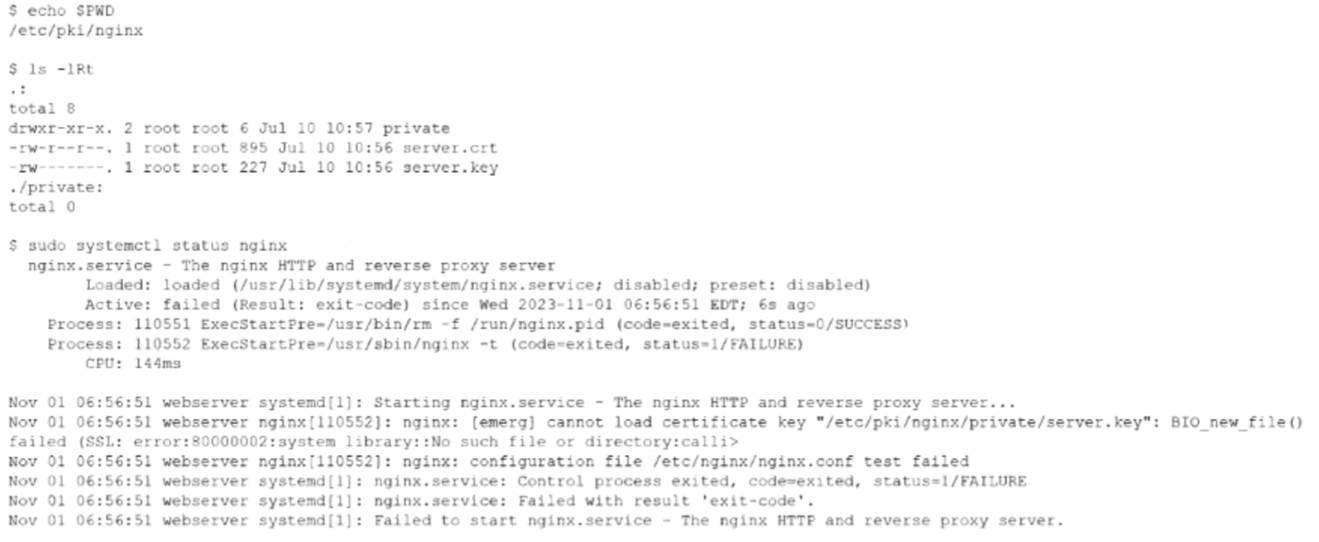
Which of the following is the reason the web service is not responding?
Correct Answer:
C
This issue falls under the Troubleshooting domain of the CompTIA Linux+ V8 objectives, specifically service startup failures and certificate-related errors. The provided output clearly indicates that the NGINX service fails during startup due to an inability to locate the private key file.
The critical error message is:
cannot load certificate key "/etc/pki/nginx/private/server.key": No such file or directory
This message confirms that NGINX is explicitly configured to look for the private key in the directory /etc/pki/nginx/private/. However, the directory listing shows that the private directory exists but is empty, while the server.key file is located in /etc/pki/nginx/ instead. Because NGINX cannot find the private key at the configured path, the configuration test (nginx -t) fails, and systemd prevents the service from starting.
Option C correctly identifies the root cause: the private key is not in the correct location. Moving server.key into /etc/pki/nginx/private/ (or updating the NGINX configuration to match the current location) would resolve the issue. Linux+ V8 documentation stresses that service failures often result from misaligned configuration paths rather than corrupted files.
The other options are incorrect. Option A incorrectly refers to renaming a certificate file and does not address the path issue. Option B suggests a key mismatch, which would generate a different SSL error rather than a "file not found" error. Option D is also incorrect because private keys should not have executable permissions like 0755; typically, they are restricted (for example, 0600) for security reasons.
Therefore, the web service is not responding because the private key file is not located in the directory expected by the NGINX configuration. The correct answer is C.
A Linux administrator updates the DNS record for the company using:
cat /etc/bind/db.abc.com
The revised partial zone file is as follows:
ns1 IN A 192.168.40.251
ns2 IN A 192.168.40.252
www IN A 192.168.30.30
When the administrator attempts to resolve www.abc.com to its IP address, the domain name still points to its old IP mapping:
nslookup www.abc.com
Server: 192.168.40.251
Address: 192.168.40.251#53
Non-authoritative answer
Name: www.abc.com
Address: 199.168.20.81
Which of the following should the administrator execute to retrieve the updated IP mapping?
Correct Answer:
D
This scenario represents a classic DNS troubleshooting situation covered in the Troubleshooting domain of the CompTIA Linux+ V8 objectives. Although the DNS zone file has been updated correctly on the BIND server, the system continues to resolve the domain name to an outdated IP address. This behavior strongly indicates DNS caching rather than a configuration error in the zone file itself.
Modern Linux systems that use systemd-resolved cache DNS responses locally to improve performance and reduce external queries. Even after a DNS record is updated on the authoritative server, cached results may persist until the cache expires or is manually cleared. The nslookup output showing a non-authoritative answer further confirms that the response is being served from a cache rather than directly from the updated zone data.
The correct solution is to flush the local DNS cache so the system can retrieve the updated record from the DNS server. The command resolvectl flush-caches clears all cached DNS entries maintained by systemd- resolved, forcing fresh queries to authoritative name servers. This aligns directly with Linux+ V8 documentation for resolving name resolution inconsistencies caused by stale cache entries.
The other options are incorrect for the following reasons. systemd-resolve query www.abc.com performs a DNS lookup but does not clear cached entries. systemd-resolve status only displays resolver configuration and statistics. service nslcd reload reloads the Name Service LDAP daemon and is unrelated to DNS resolution or caching.
Linux+ V8 emphasizes identifying whether issues originate from services, configuration, or cached data. In this case, flushing the DNS cache is the correct and least disruptive corrective action.
Therefore, the correct answer is D. resolvectl flush-caches.