
Referring to the exhibit, you have been assigned the user LogicalSYS1 credentials shown in
the configuration.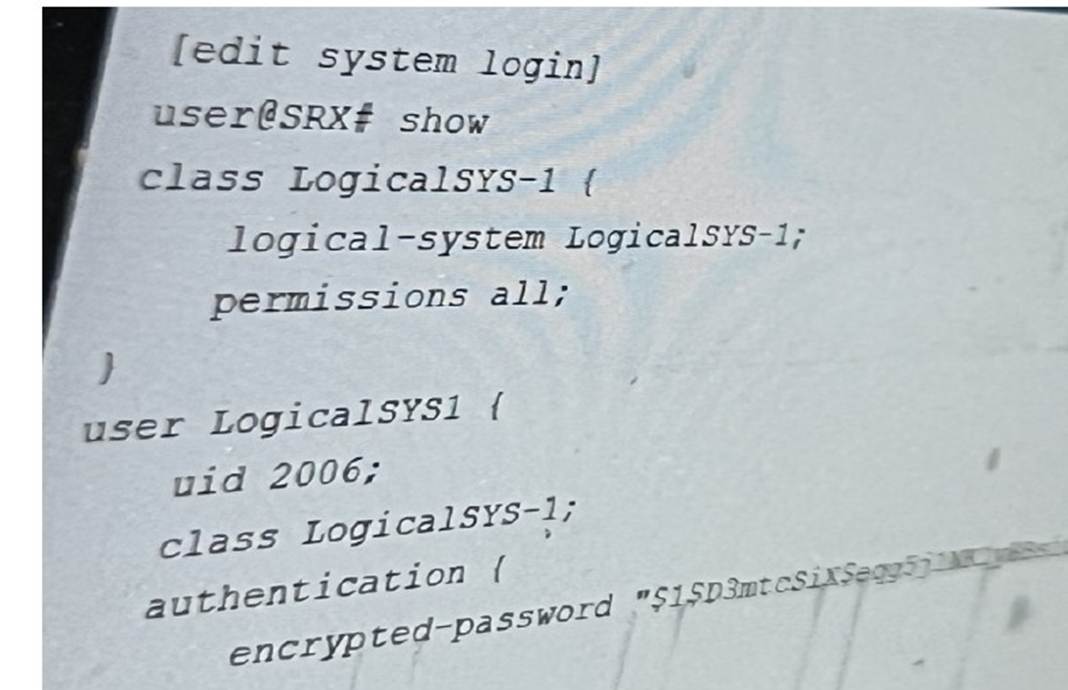
In this scenario, which two statements are correct? (Choose two.)
Correct Answer:
BC
You are enabling advanced policy-based routing. You have configured a static route that
has a next hop from the inet.0 routing table. Unfortunately, this static route is not active in your routing instance.
In this scenario, which solution is needed to use this next hop?
Correct Answer:
A
To enable advanced policy-based routing in Junos OS and activate a static route with a next-hop address in the inet.0 table within your routing instance, you should utilize RIB groups. RIB groups allow you to import routes from one routing table to another. In this scenario, the static route within the routing instance needs access to the inet.0 routes, which is facilitated by configuring a RIB group. Juniper??s documentation outlines RIB groups as a necessary component for handling instances where routes need to be shared across routing tables, thereby ensuring seamless traffic flow through specified routes. For more details, refer to the Juniper Networks Documentation on RIB Groups.
In Junos OS for SRX Series devices, when enabling advanced policy-based routing and configuring a static route with a next-hop from the inet.0 routing table, the issue arises because the static route is not being used in the routing instance. This is a common scenario when the next-hop belongs to a different routing table or instance, and the routing instance is not aware of that next-hop.
To resolve this, RIB (Routing Information Base) groups are used. RIB groups allow routes from one routing table (RIB) to be shared or imported into another routing table. This means that the routing instance can import the necessary routes from inet.0 and make them available for the routing instance where the policy-based routing is applied.
Detailed Steps:
✑ Configure the Static Route: First, configure the static route pointing to the next-hop in inet.0. Here??s an example:
bash
set routing-options static route 10.1.1.0/24 next-hop 192.168.1.1 This static route will be placed in the inet.0 routing table by default.
✑ Create and Apply a RIB Group: To import routes from inet.0 into the routing
instance, create a RIB group configuration. This will allow the static route from inet.0 to be visible within the routing instance.
Example configuration for the RIB group: bash
set routing-options rib-groups RIB-GROUP import-rib inet.0
set routing-options rib-groups RIB-GROUP import-rib
This configuration ensures that routes from inet.0 are imported into the specified routing instance.
✑ Apply the RIB Group to the Routing Instance: Once the RIB group is configured,
apply it to the appropriate routing instance:
bash
set routing-instances
✑ Verify Configuration: Use the following command to verify that the static route has been imported into the routing instance:
bash
show route table
The output should now display the static route imported from inet.0.
Juniper Security Reference:
✑ RIB Groups Overview: Juniper's documentation provides detailed information on how RIB groups function and how to use them to share routes between different routing tables. This is essential for scenarios involving policy-based routing where routes from one instance (like inet.0) need to be available in another instance. Reference: Juniper Networks Documentation on RIB Groups.
By using RIB groups, you ensure that the static route from inet.0 is available in the appropriate routing instance for policy-based routing to function correctly. This avoids the need for other methods like filter-based forwarding or transparent mode, which do not address the specific issue of static route visibility across routing instances.
==========
You need to set up source NAT so that external hosts can initiate connections to an internal device, but only if a connection to the device was first initiated by the internal device.
Which type of NAT solution provides this functionality?
Correct Answer:
C
Persistent NAT with target host allows external hosts to establish
connections only when the internal device initiates a session first, ideal for specific interactive applications. Refer to Juniper Persistent NAT Documentation.
The scenario requires that external hosts be able to initiate a connection only if the internal device has already initiated a connection. The correct solution is Persistent NAT with target host, which ensures that a specific external host can initiate new connections back to the internal device, but only after the internal device has established a session first.
✑ Persistent NAT with Target Host (Answer C): This allows the internal device to
initiate a connection, and once established, the specified external host can also initiate new connections to the internal device on the same NAT mapping.
Example Configuration: bash
set security nat source persistent-nat permit target-host-port
This solution is appropriate when controlled bidirectional communication is required based on an internal-initiated connection.
: Juniper persistent NAT documentation.
==========
You want to test how the device handles a theoretical session without generating traffic on the Junos security device.
Which command is used in this scenario?
Correct Answer:
A
The request security policies check command allows you to simulate a session through the SRX device, checking the security policy action that would apply without needing to send real traffic. This helps in validating configurations before actual deployment. For more details, see Juniper Security Policies Testing.
The command request security policies check is used to test how a Junos security device handles a theoretical session without generating actual traffic. This command is useful for validating how security policies would be applied to a session based on various parameters like source and destination addresses, application type, and more.
✑ Explanation of Answer A (request security policies check):
bash
request security policies check from-zone trust to-zone untrust source 10.1.1.1 destination 192.168.1.1 protocol tcp application junos-https
Juniper Security Reference:
✑ Security Policies Check: This command provides a way to simulate and verify security policy behavior without actual traffic. Reference: Juniper Security Policy Documentation.
==========
Exhibit: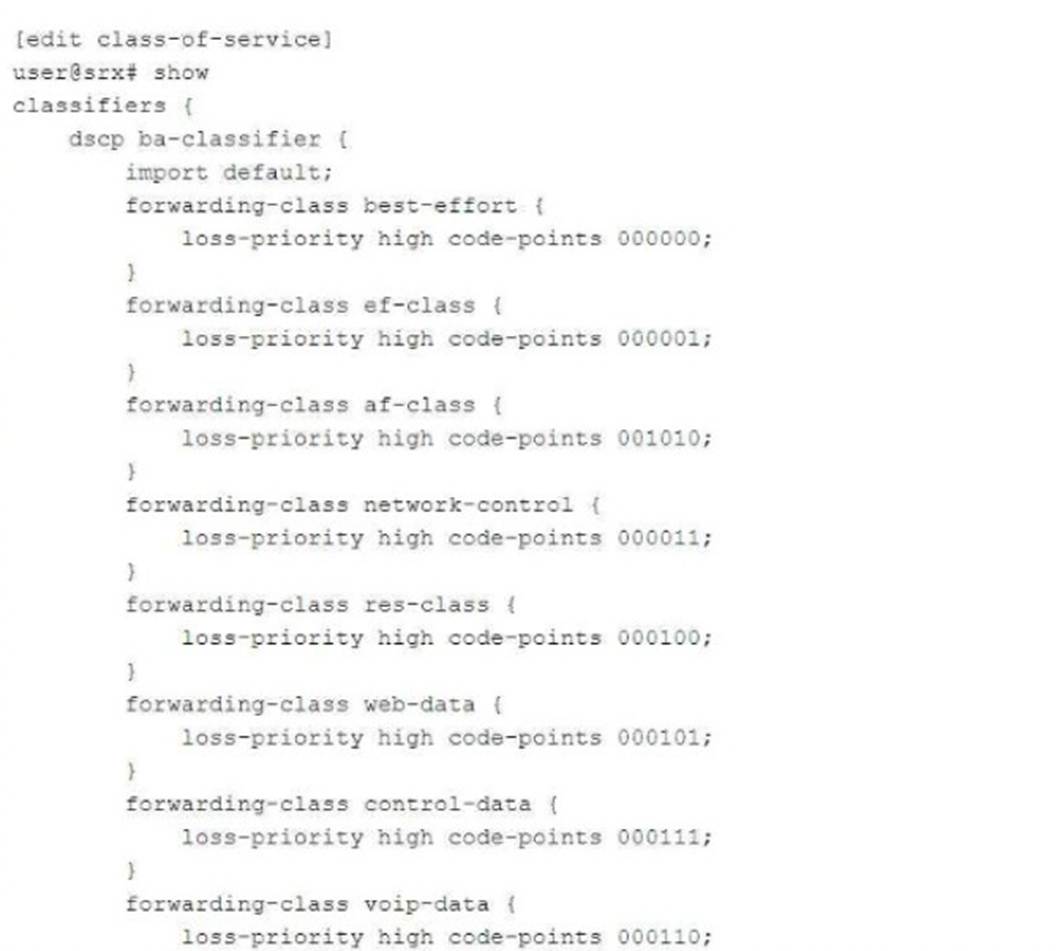
You have configured a CoS-based VPN that is not functioning correctly. Referring to the exhibit, which action will solve the problem?
Correct Answer:
A
In the exhibit, the CoS-based VPN configuration is not functioning correctly due to an issue with the number of forwarding classes. The maximum number of forwarding classes supported for CoS-based VPNs with multiple SAs (security associations) is typically four forwarding classes. In this case, more than four forwarding classes are defined.
To solve the issue, one forwarding class must be deleted to ensure that the total number of forwarding classes is reduced to four or fewer.
: Juniper CoS-based VPNs and forwarding class limitations.
==========